
How to Grow a Discord Server: Real Members vs. Raw Numbers in 2026
Stop wasting time on dead-end growth hacks. This guide details how to get more members on Discord using organic methods and vetted paid services that deliver real results.

Growing a Discord server past your first few friends is challenging. This guide explains the difference between organic growth and paid member services. Knowing how to get more members on Discord means understanding both methods and when to use them.
Discord Server Growth: The process of increasing a server's user count through organic marketing, community events, or paid services. A high member count acts as social proof. It makes a server look more active and trustworthy, which encourages new users to join and stay.
Key Takeaways
- Optimize Onboarding First: A confusing welcome experience loses members. Create a clear, role-based onboarding flow before you try to get new users.
- Use Listing Sites for Traffic: Platforms like Disboard provide consistent, low-volume traffic. They require daily effort for small but steady gains.
- How to Vet Paid Services: Real providers use public invites, not account tokens. Before buying, check their member drop rates and refill guarantees.
- The Goal of Paid Members: Bought members provide social proof, not engagement. They inflate the member list to make the server look established, but they will not chat.
- Prioritize Retention Over Numbers: An active server with 500 engaged members is better than a dead server with 5,000. Focus on what keeps users logging in.
The Organic Grind: Building a Real Community
Organic growth is slow, but it brings members who actually participate. These methods focus on creating a server people want to join and stay in. The return here is a healthy community and long-term activity, not a quick jump in member count.
How Can I Use Server Listing Sites?
Platforms like Disboard and Top.gg are common starting points. You list your server with relevant tags so users browsing those categories can find you. Most of these sites use a "bump" system. This system lets you move your server to the top of the list, usually every few hours. Discord also has its own Server Discovery directory for eligible Community servers, which is worth checking once your server qualifies.
- Mechanism: Bumping commands, tag optimization.
- Result: A slow but steady stream of new members. The quality is mixed, as many users who join this way are inactive.
- Tradeoff: This requires daily effort for a low number of joins. It's a basic step, not a high-growth plan.
An active server is its own best marketing.
How Do Partnerships Help Grow a Server?
Partnering with other servers in a similar niche is a very effective method. This means you agree to promote each other's communities, often in a dedicated #partners channel. A good partnership requires finding a server with a similar member size and activity level. This ensures the value exchange is fair. The key is to find communities whose members would be genuinely interested in your server.
What Kind of Events Can I Run?
Running events like game nights, AMAs (Ask Me Anything) with experts, or workshops creates engagement. This activity not only keeps current members but also creates word-of-mouth growth. When members find value, they invite their friends.
Giveaways can boost joins for a short time. Be careful with giveaways that reward people for inviting others: Discord's Platform Manipulation Policy lists "invite rewards" as a way of artificially inflating server membership. Even when allowed, the retention of giveaway joiners is often low unless the server gives immediate value beyond the prize.
Analyzing Paid Discord Member Services
For many server owners, organic growth is too slow. Paid services offer a way to get social proof quickly. However, the quality of these services varies a lot. If you've ever bought members and watched them disappear, you likely used a low-quality provider.
Legitimate SMM services that provide members operate on a simple principle. They have a network of accounts that will join your server via its public invite link. They never ask for administrator permissions or user tokens. A request for tokens is a huge red flag for a server-hijacking scam.
When buying, you will see two main products:
- Offline Members: These accounts join and appear on the member list but stay offline. They are the cheapest option and only inflate the total member count.
- Online Members: These accounts join and are kept online 24/7. They make the server look more active but cost more. They will not interact, type, or join voice channels.
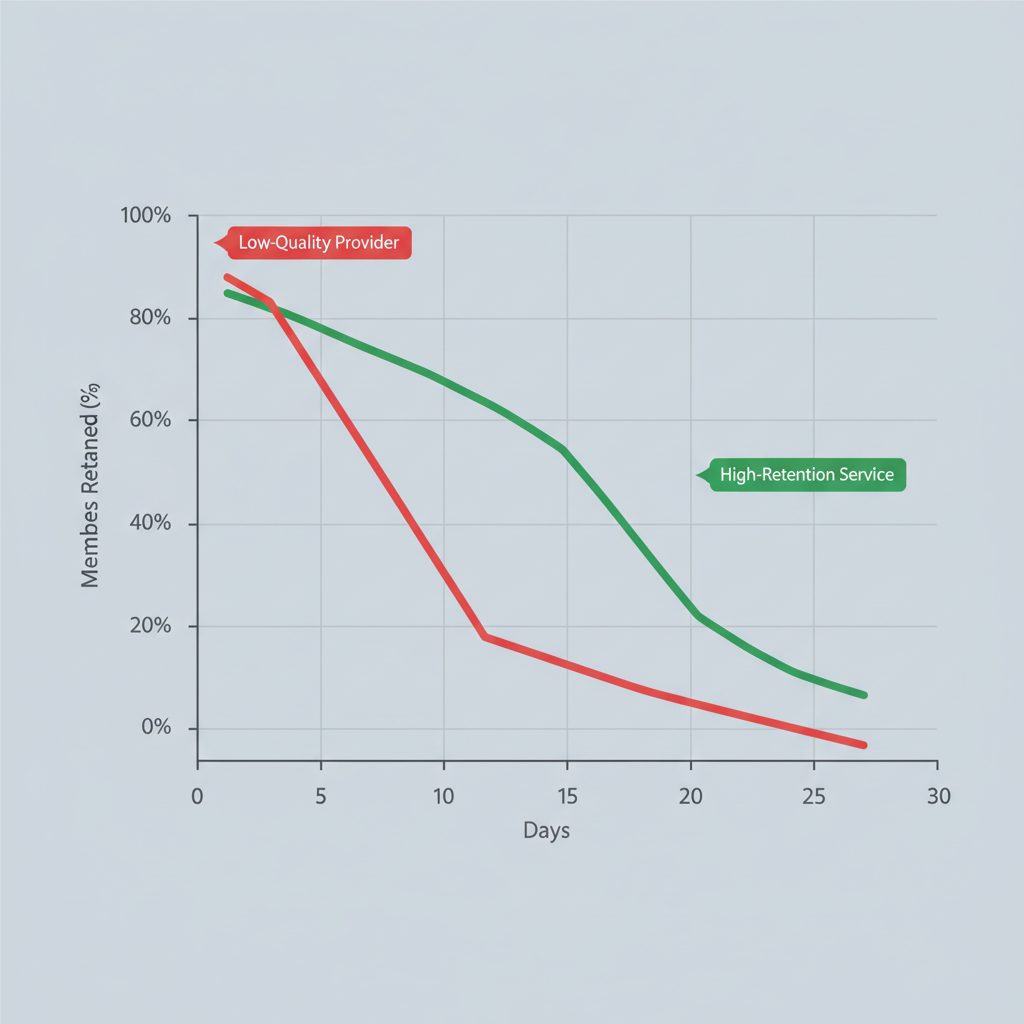
The main risk is the drop rate. Discord regularly purges bot and inactive accounts. Cheap providers have services with drop rates of 30-50% or more within a month. In contrast, reputable providers use better accounts and offer a 30-day refill guarantee, where any members that drop are replaced. You can browse a directory of Discord member services and current prices to compare provider metrics.
Paid members are a tool for credibility, not a substitute for community.
Growth Method Comparison
| Option | Speed | Cost | Engagement Quality | Risk Profile | Best For |
|---|---|---|---|---|---|
| Listing Sites | Slow | Free | Low to Medium | Low | Foundational, steady growth. |
| Partnerships | Medium | Free (Time) | High | Low | Niche community building. |
| Events/Content | Slow | Low (Time) | Very High | Low | Long-term member retention. |
| Paid Offline Members | Very Fast | Low | None | Medium | Quickly hitting a member count milestone. |
| Paid Online Members | Very Fast | Medium | None | Medium | Making a new server look active. |
| Giveaway Campaigns | Fast | Varies | Very Low | Low | Short-term, rapid join spikes. |
How to Create an Effective Discord Onboarding Flow
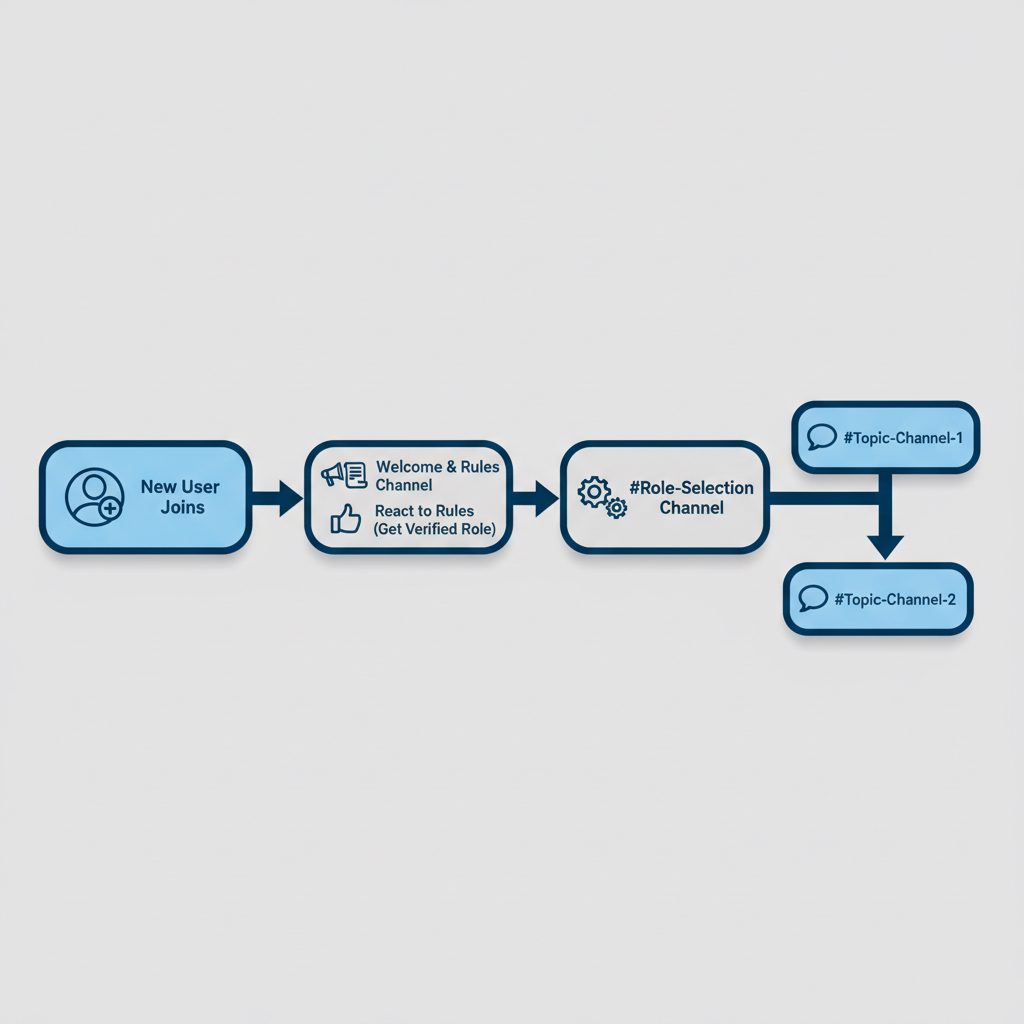
A solid onboarding process is important for turning new joins into active members. A confusing server prompts new users to leave within minutes. A good flow guides users to the relevant parts of your community.
- Configure a Private Welcome Channel: Set up a channel only new members can see. Use your server settings under "Overview" to designate this channel. Post the first instructions here.
- Automate Greetings with a Bot: Use a bot like MEE6 or Carl-bot to automatically send a welcome message. This message should tag the new user and direct them to your rules and role-selection channels.
- Establish a Clear Rules Channel: Create a channel with your server rules. Use a bot to require users to react with an emoji to the rules post. This action gives them a basic "Verified" role.
- Implement Reaction Roles: Set up a
#roleschannel where users can self-assign roles based on their interests (e.g., "Gamer," "Artist"). These roles will unlock corresponding channels. - Gate Channels by Role: Configure channel permissions so most channels are invisible to users without the right roles. This prevents overwhelm and shows users only what is relevant to them.
Why do cheap Discord members disappear?
Cheap Discord members disappear because they come from low-quality bot networks. Discord's anti-spam systems easily detect and purge these networks. The accounts are often created in bulk using flagged IP addresses or compromised tokens. As a result, Discord's automated systems flag them for suspicious activity, leading to mass bans. High drop rates are a sign of a low-tier, unsustainable service.
What to do this week
- Audit your onboarding: Go through your server's join process as a new user. Is it clear? Does it guide them to active channels within 3 clicks? Fix any friction.
- Check your server insights: Navigate to Server Settings > Server Insights and review your member retention data. This feature unlocks once your server meets Discord's current member threshold.
- Bump your server daily: If you're listed on Disboard or a similar site, commit to bumping your server at every available opportunity for one week. Measure the total number of organic joins from this effort.
- Analyze past orders: If you have purchased members before, calculate the 30-day drop rate. If it was over 20%, your provider is low-quality. Find one with a public, guaranteed refill window.
FAQ
Can buying Discord members get my server banned?
It can. Discord's Platform Manipulation Policy prohibits "artificially inflating server membership (for example, via "join-for-join," "invite rewards," purchasing fake members)", so a purchase breaks Discord's rules even when members arrive through a public invite link. The most common outcome is the members being purged, but enforcement against the server or account is possible. Never give out admin permissions or use services that require your account token.
How many members do I need for a server to look credible?
There is no magic number, but most users see servers with under 100 members as very new. A common goal is to reach a baseline of 500-1,000 members. This establishes social proof for new visitors.
What's the difference between 'offline' and 'online' members?
Offline members join and immediately appear offline. They only inflate the total count. Online members are accounts kept running 24/7 so they always show a green 'online' status. They cost more and are used to make a server appear active, but neither type will engage.
Are members from SMM panels real people?
No. Almost all Discord member services deliver bot accounts. Terms like "HQ" or "Real" are marketing language. Their purpose is social proof, not genuine interaction.